Bringing your existing sheet music archive: the move, step by step
Excel list, folder full of PDFs, ZIP or member list: how the import assistant takes over your existing archive, with a preview, a full log and a way back.
Read the guide →Ready to use today – web app, iPhone, iPad, Android and e-readers
Notenarchiv digitises your entire library and plans your rehearsals and performances: let AI assign the parts, collect yes and no replies – and every member has exactly the music they need. On the computer, on a tablet or on the phone.
60 days free · no credit card · hosted in the EU

Six things that set Notenarchiv apart from other sheet music management software.
Notenarchiv is in daily use – as a web app and as an app on the App Store and Google Play. No waiting list, no closed beta.
From €12.90 a month for the whole organisation. Only active users of the last 90 days count – former and inactive users cost nothing.
The application and your sheet music are hosted at Hetzner in data centres in Germany and Finland – inside the EU and under a data processing agreement per Art. 28 GDPR. Your data never leaves European jurisdiction. And the app itself sets neither tracking nor advertising cookies.
Instrument recognition reads the instrument name from every PDF page and assigns parts automatically. Optional and switched off by default.
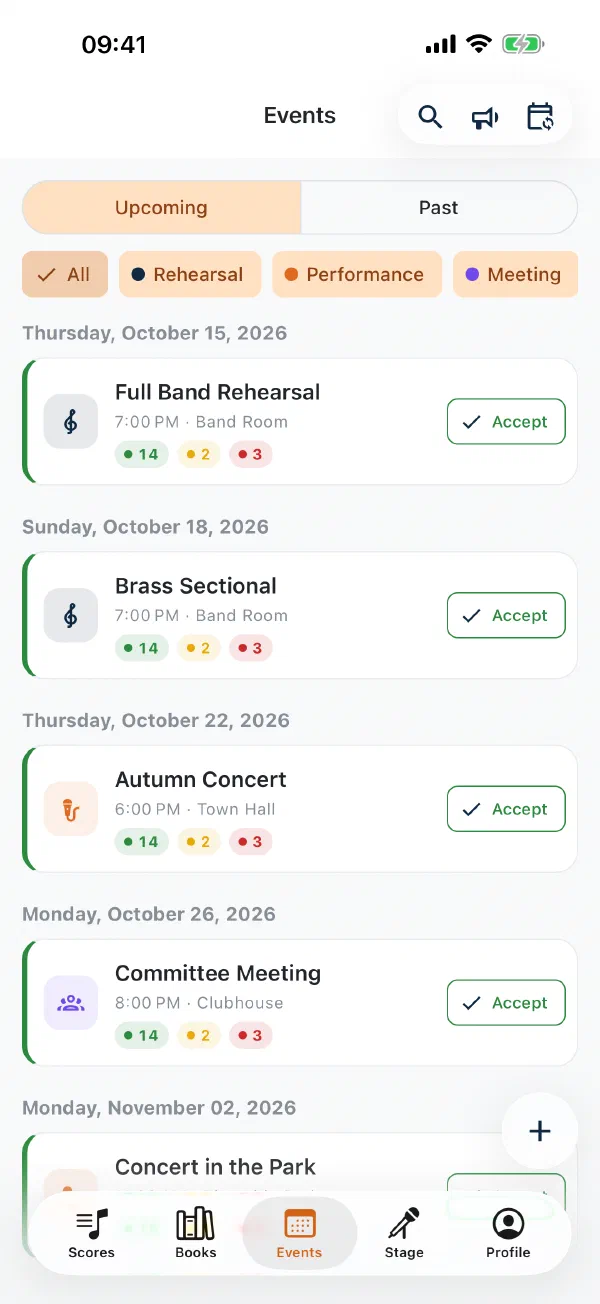
Rehearsals and performances with yes and no replies, push reminders and attendance by section – right next to the sheet music. The programme is attached to the event, so the parts are on every device in time. Included in every organisation plan.
Log in with a magic link or a passkey using Face ID, fingerprint or device PIN. Nothing to remember, nothing to forget – and phishing-resistant.
Stacks of paper in the music cabinet, missing parts before the concert, hours spent searching for the right edition – every music club, every orchestra and every band or dance band knows this. At the same time, more and more musicians use iPads, tablets and e-ink readers on stage, in the rehearsal room and on the march. They expect their sheet music to be available digitally – and want to upload their own scans to the archive without any hassle.
Notenarchiv was developed specifically for the needs of music clubs, bands, dance bands, orchestras and ensembles – so that your entire sheet music collection is managed centrally and fully digitally. No clumsy file system, no complicated software, but a web app that does exactly what a librarian needs day to day. Every piece can be found instantly and is available at any time – whether on the computer, the tablet or the phone. And because rehearsals and performances are planned in the same app, the conductor knows in advance who is coming – and everyone has the right parts with them for the event.
On e-readers and e-ink tablets too
The Notenarchiv app runs on Android e-ink tablets and e-book readers – for example from Onyx Boox, Tolino or PocketBook. It recognises the device and switches to e-paper mode: razor-sharp black and white, no animations, no flicker.
E-ink does not reflect and does not glow. The brighter the sun at the parade or on the open-air stage, the easier the page is to read.
Black, white and a single grey, borders instead of shadows, zoom in fixed steps: the display redraws once – every tap lands.
Pen, stamps and notes work on the e-reader too. Fermatas, breath marks and dynamics sit right in your part.
A page that stays put uses almost no power. With march mode, Stage Mode over Bluetooth and offline music you are ready for the parade.
Android only – there are no e-ink devices running iOS. If the app does not recognise your device, switch on e-paper mode yourself in your profile. Included in every plan.
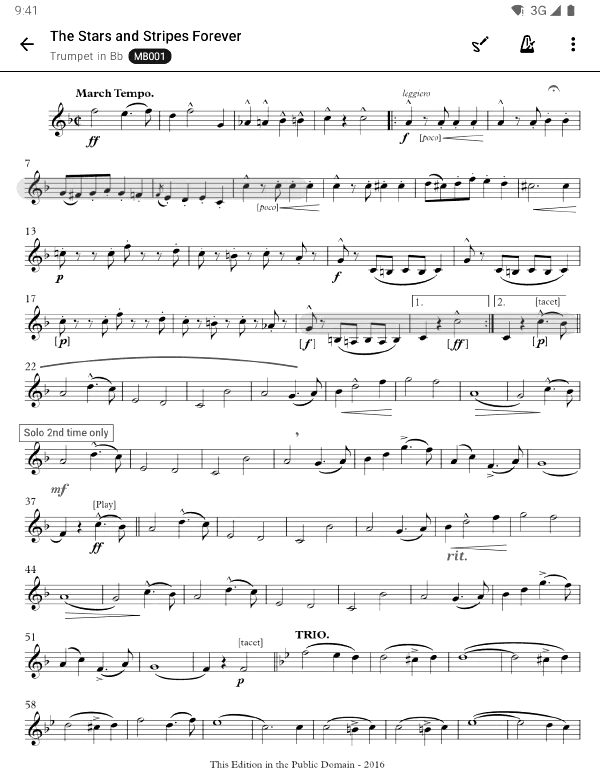
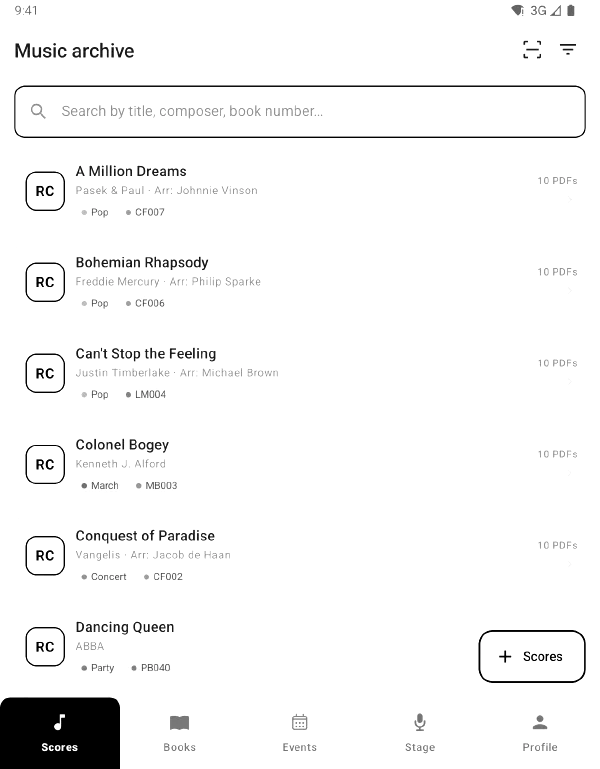
All pieces centrally in one place: search, filter and organise your entire sheet music collection with real-time search.
Music like on paper: the app runs on Android e-ink tablets and e-book readers and switches to e-paper mode – razor-sharp, no flicker, readable in the sun. With march mode and battery for the whole festival day.
Excel list, folder full of PDFs or ZIP: the import assistant automatically recognises books, pieces and parts from your folder structure and takes over your collection – with preview, duplicate check and log.
Rehearsals, performances and meetings addressed to the whole organisation, to groups or to individual sections – with yes/no replies, push reminders and attendance per section.
Split A3 into 2x A4, break collective PDFs into individual parts -- right in the browser, without any extra software.
Mark an area, and the AI automatically recognises the instrument on every page -- and assigns the parts.
Organise pieces in music books and folders. Download all parts of one instrument from a book at once.
The Notenarchiv app is available for iPhone, iPad and Android – view sheet music, scan it with the camera and manage it on the go. New events arrive as a push notification, and replying yes or no takes a single tap.
Members see and download only the parts for their own instruments. Librarians and admins manage the entire collection -- with clear roles and permissions.
Write straight onto the page with an Apple Pencil or S Pen, place stamps for fermata, segno and dynamics – and trim white margins so the notes appear larger.
Prepare the set list and send it to every device over Bluetooth – on stage, in the marquee and on the march, even without a network. The conductor calls the change of piece, everyone turns pages in their own part.
Dance band, party band or brass band: the bandleader rearranges the set list in the middle of the gig, everyone follows. Stand-ins get their music via a link – no account needed.
If you play in the brass band and the dance band, just switch organisation after logging in – each group has its own music, events and members.
WhatsApp polls, group emails, Doodle links – and on rehearsal night half the clarinets are still missing. Notenarchiv puts rehearsals, performances and meetings in the same app as your sheet music. The conductor knows in advance who is coming.
The event arrives as a push notification, members reply yes, no or maybe – with a deadline and a reminder for everyone who has not replied yet.
Seven of nine clarinets, no tuba: attendance by section shows days in advance where things get thin – not only during warm-up.
The programme is attached to the event. The app downloads everyone's parts to their device beforehand – everything is there even in a rehearsal room without signal.
Calendar subscription for Apple, Google and Outlook, performances as a widget on your website. When an event moves, the time is right everywhere.
This is what Notenarchiv looks like in action.
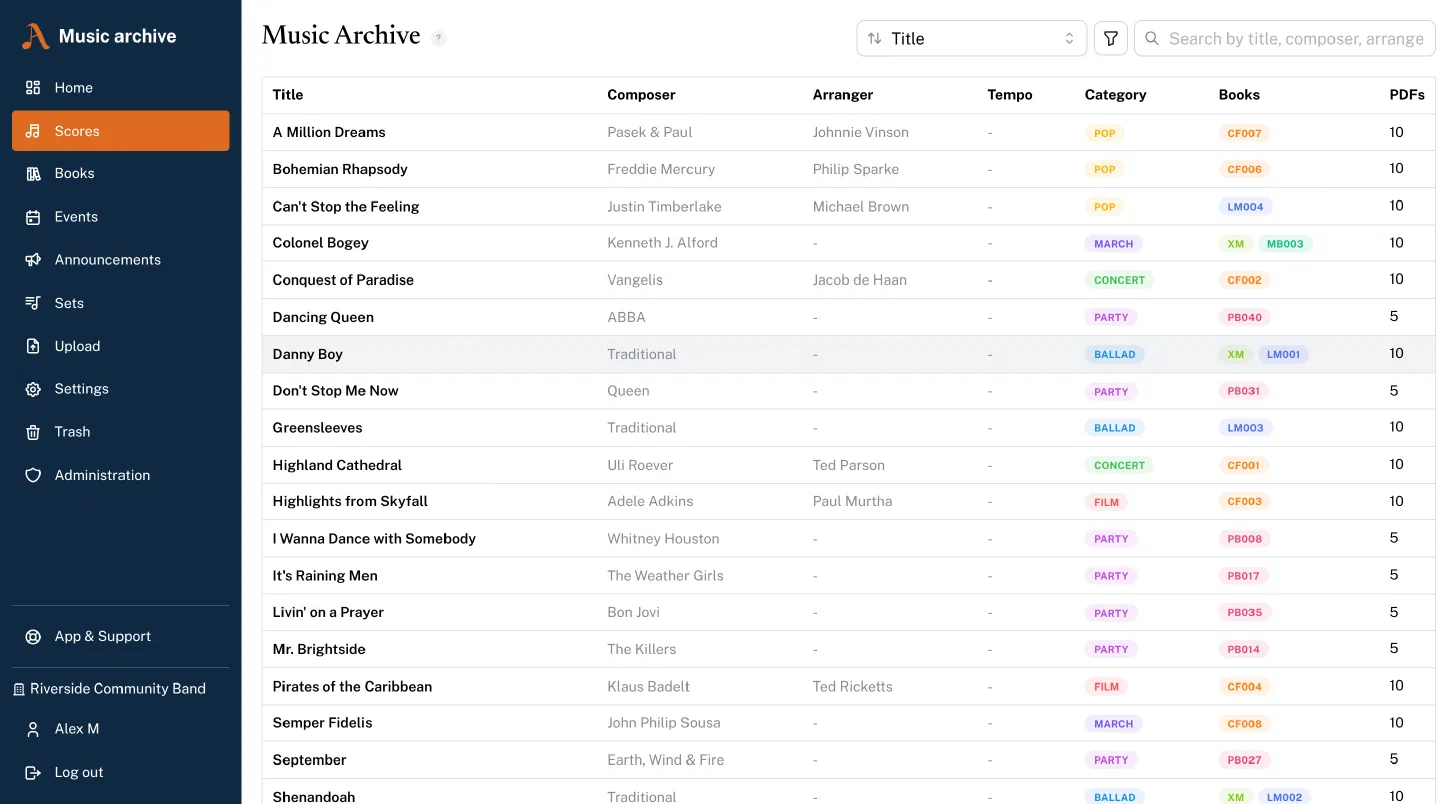
Sheet music overview with search and categories
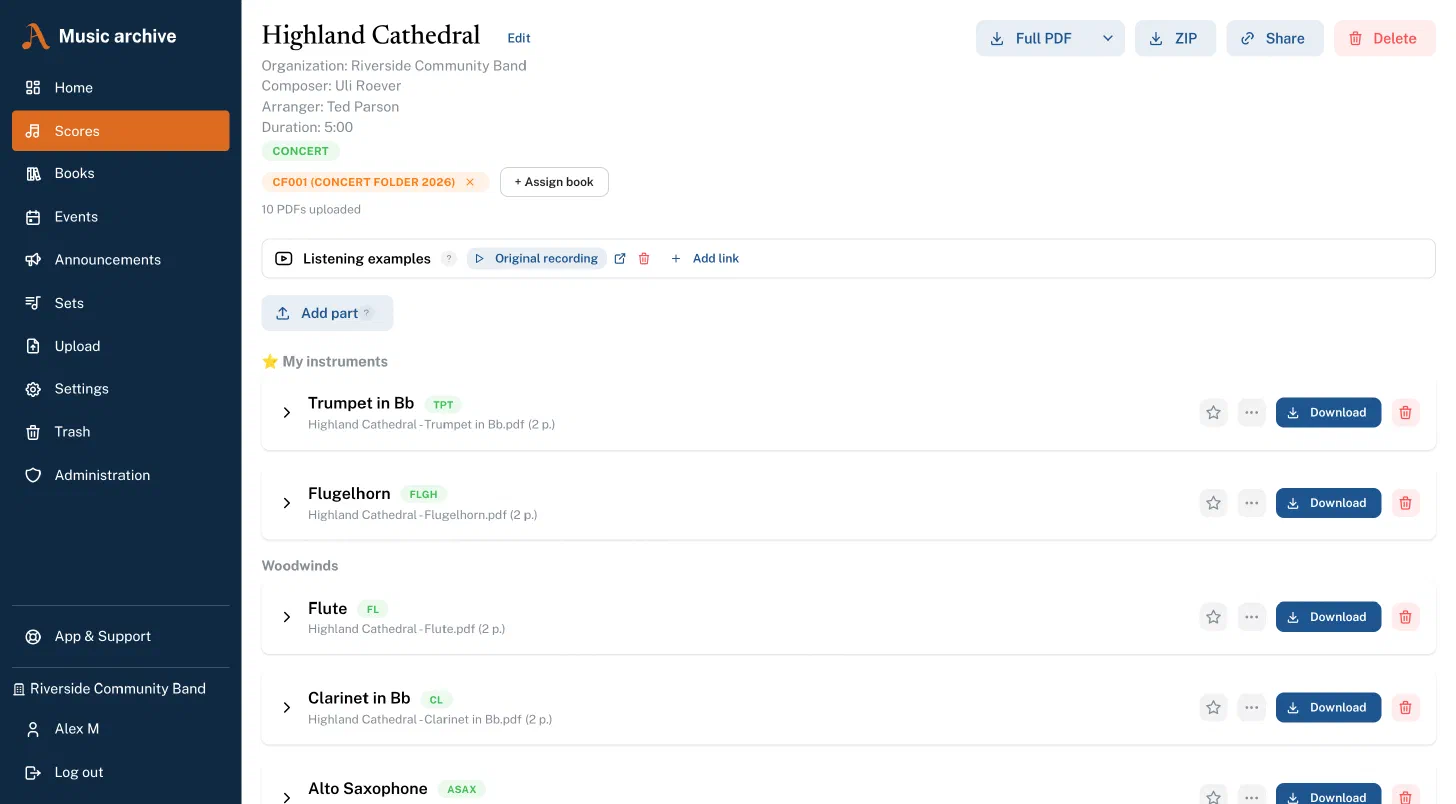
Piece detail with parts and downloads
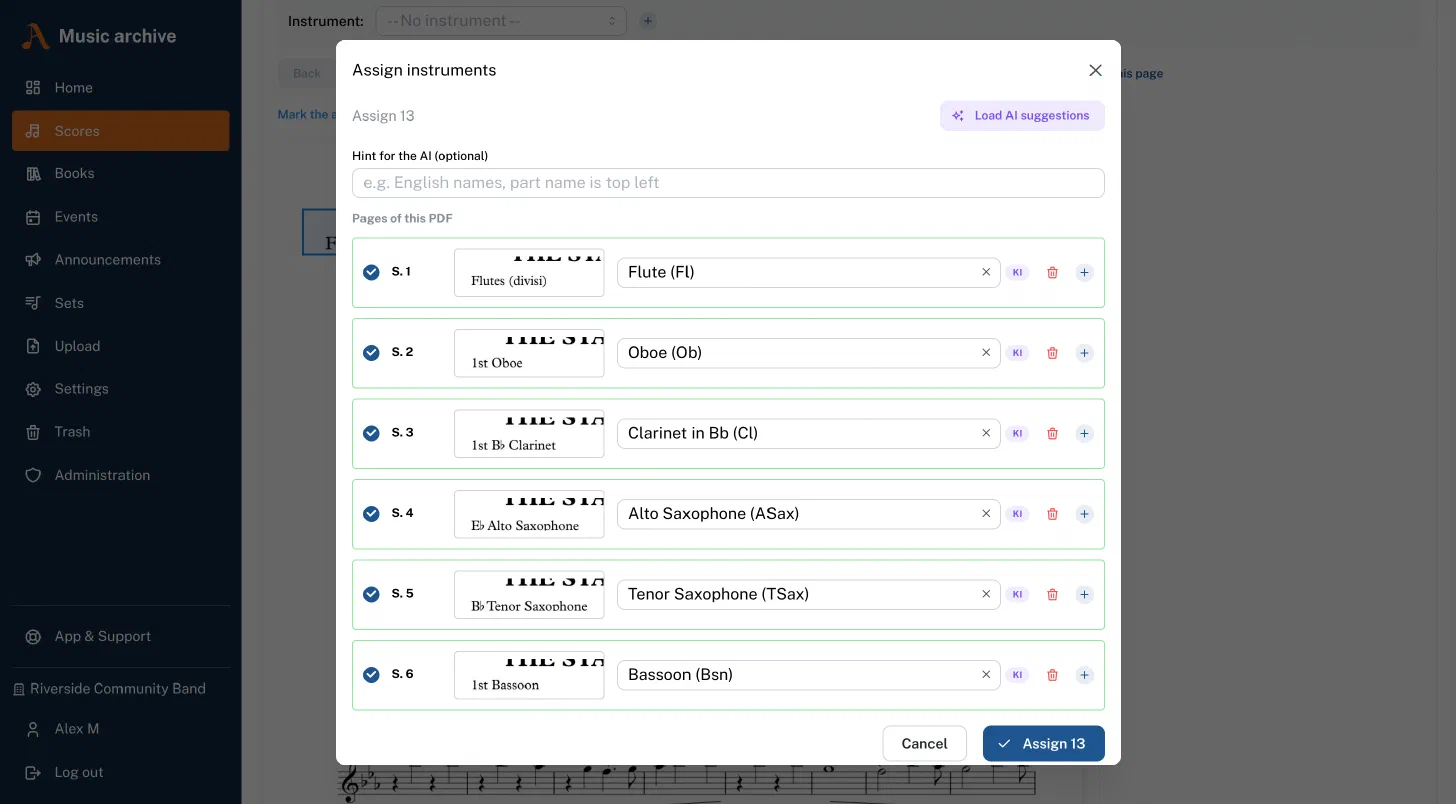
Automatic AI instrument recognition
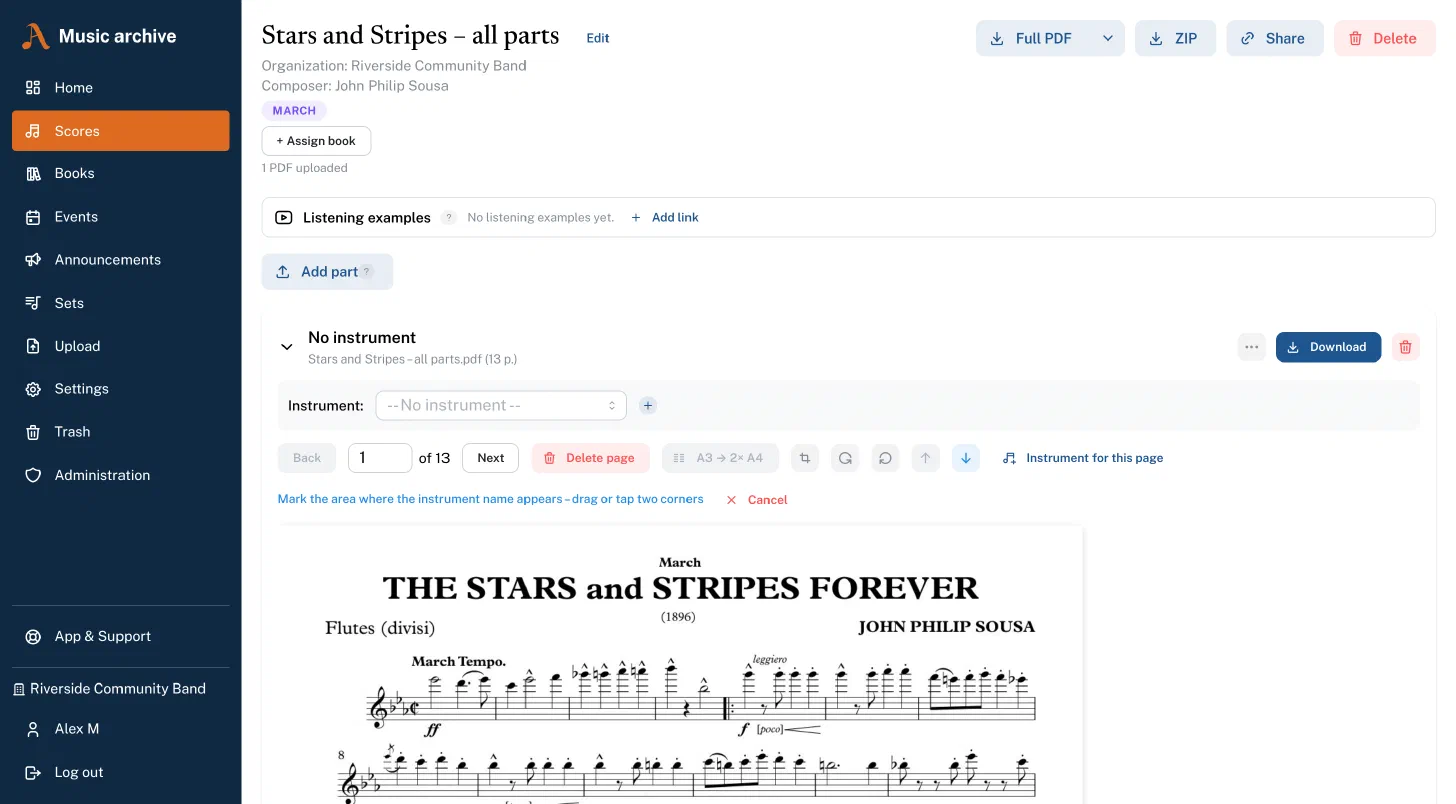
PDF tools and instrument assignment
Screen recording from Notenarchiv: a 50-page collective PDF is uploaded, the AI identifies the instrument on every page and assigns 48 parts automatically.
From the first scan to Friday's rehearsal – five typical workflows that show how Notenarchiv simplifies your everyday life.
Your librarian creates a new piece – title, composer, arranger and category are entered in seconds. The scanned PDFs are then uploaded directly: flute, clarinet, trumpet 1, trombone – each part as its own file. During upload the librarian selects the matching instrument, and the assignment is done.
Did the scanner capture A3 pages in landscape? No problem – Notenarchiv detects landscape and A3 pages automatically and shows a notice. With one click the affected pages are cleanly split into two A4 pages. Rotated pages, blank back sides or an incorrect page order can also be corrected right in the app – without any extra software.
Finally, the piece is assigned to a music book. Your main folder has the code "SO"? Then the piece gets the number SO203 – and is available to all members from that moment on. Each member only sees the parts that match their assigned instruments. So the trumpeter immediately finds her trumpet part without having to scroll through dozens of other parts.
A club member selects their instrument on the upload page – for example "flugelhorn" – and uploads their entire sheet music folder as PDFs. 30 files, 50 files, no problem. Notenarchiv automatically detects duplicates: if a file already exists in the archive, it is not stored twice but linked directly to the existing piece.
All new files first land in the "Unassigned" area. This is where the smart assignment begins: Notenarchiv analyses the file names automatically. A file called SO203_Böhmischer_Traum.pdf is immediately assigned to the right book and the right number – without any manual searching.
For files that cannot be clearly identified by their file name, AI recognition is on hand. One click on "Load AI suggestions", and the system analyses all open files in the context of your entire sheet music archive. It detects which pieces already exist and which need to be created – and proposes the right assignment.
With "Apply all suggestions" every recognised assignment is applied in a single step. For the few remaining files, a quick search for the piece title is enough – or you create a new piece inline, without leaving the page.
Your librarian opens the books page and selects the desired book – for example the "main folder" or the "march book". Using the search, they quickly find the piece to be added and assign it a number. Piece by piece, a complete music book with clear numbering takes shape: SO001, SO002, SO003 – or MB007a, MB007b for multi-part pieces.
Each member now simply opens the book, selects their instrument from the dropdown and clicks "All pieces as ZIP". In seconds they have a ZIP file with all the parts for their instrument – either as PDF or forScore file, neatly named by book number and instrument code. SO203_Böhmischer_Traum_Trp1.pdf, SO204_Egerländer_Musikantenmarsch_Trp1.pdf – all in the right order, ready to print or import directly into forScore.
Thanks to permission management, every member sees only the books and instruments assigned to them. The drummer is not confused by trumpet parts, and the flute does not see the march book they do not need.
Whoever is librarian or admin in your organisation – often the conductor or the secretary – creates the full rehearsal: title, Friday 7.30 pm, rehearsal room at the clubhouse. While creating it, they decide who is meant – the whole organisation, a group such as the youth band, or individual sections. For a brass sectional, the flute never sees the event at all.
Members get the event as a push notification – on the Premium plan also by email – and reply with one tap: yes, no or maybe. Anyone who says nothing by the set deadline shows up as open in the list. If something about the event changes, the notifications go out bundled rather than one by one.
Before the rehearsal, attendance by section shows where it gets thin: seven of nine clarinets, three of three trumpets, percussion complete. If a section is almost entirely missing, that is clear beforehand – not when the warm-up starts. For members who reply by phone, a librarian or admin enters the answer for them.
Anyone who would rather see the club dates in their usual calendar subscribes to them: a personal calendar link brings rehearsals and performances into Apple Calendar, Google Calendar or Outlook – new events follow along on their own.
Your librarian opens the desired piece and clicks "Share". A link is generated instantly that is valid for 14 days. This link can be sent to the external person via WhatsApp, email or messenger.
The recipient opens the link in the browser – completely without an account, without an app, without registration. They see the title, the composer and all available parts at a glance. Using the page preview, they can look directly into the individual PDFs and flip through the pages. Everything fits? Then they download all parts as a ZIP file – with customisable file names, so the files are sensibly named on their device too.
On the management page your librarian keeps the overview: which links are active? How often has a link been opened? And if a link is no longer needed, it can be deactivated early at any time.
The bandleader puts the evening together beforehand in Stage Mode: polkas, waltzes, schlager and party hits, plus placeholders for “break” and “announcement”. Every piece carries its duration – the set works out whether the first block really fills 45 minutes. With Prepare offline for performance every part is already on every device at home.
On stage they open the session and the band joins with a tap. If a request comes in, they drag it to the top of the list – and everyone’s own part jumps to the new piece at once. The change arrives over Bluetooth, so it works the same in a marquee without Wi-Fi.
The stand-in drummer has no account? They got the music in the afternoon via a share link. And anyone without a tablet follows the programme on the stage display on the TV.
Instead of a march book on the lyre, every musician carries an Android e-ink tablet. It does not reflect in the sun and lasts the whole festival day. The app recognises the device and switches to e-paper mode: black and white, no animations, zoom in steps.
The conductor opens the set list for the parade in Stage Mode. Everyone joins and switches on march mode – and the thumb on the edge no longer turns pages by accident.
When they call the next march, everyone’s own part switches over – over Bluetooth, without Wi-Fi and without mobile data. The music is already on the device anyway: an offline rule keeps the whole march book there. After the parade the same device goes into the marquee for the dance music.
Practical knowledge about digitising your sheet music library – whichever software you end up using.
Excel list, folder full of PDFs, ZIP or member list: how the import assistant takes over your existing archive, with a preview, a full log and a way back.
Read the guide →From a paper library to a digital collection – how to plan, scan, name, assign and roll out in your ensemble without the project stalling halfway.
Read the guide →Which dpi, colour or greyscale, which file format? The scanner settings that work for sheet music – plus A3, stapled editions and phone scans.
Read the guide →The scanner put every part into one file, or read A3 sheets sideways? How to break that into clean individual parts in the browser, with no PDF software.
Read the guide →Which download format fits when – and how saved instrumentations let you build a combined PDF that contains exactly the copies your rehearsal needs.
Read the guide →How the Notenarchiv app keeps your parts ready offline – automatically before every event, via rules, as a Stage Mode setlist or for individual pieces.
Read the guide →How a complete part from a music book travels into forScore in a single pass: straight from the Notenarchiv app, or via forScore's own import window.
Read the guide →Step by step to your Notenarchiv passkey on Android, iPhone, iPad, Mac and Windows, in the browser and in the app. Plus help for when something goes wrong.
Read the guide →March book, concert and dance music on one Android e-ink tablet – readable in the sun, locked against your thumb, the next piece arrives over Bluetooth.
Read the guide →Start with a free 60-day trial. No credit card, no automatic renewal.
One price for the whole organisation – tiered by active users of the last 90 days.
All prices incl. statutory VAT.
or €129 /year (save €25.80)
For small bands that mainly need the music library: up to 40 active users, 50 GB of storage for around 17,500 pieces. All core features including the apps, markings and event planning.
Try for freeor €249 /year (save €49.80)
For most bands: up to 40 active users. More users? L: up to 80 (€34.90) · XL: unlimited (€49.90)
100 GB of storage for around 35,000 pieces (L: 150 GB, XL: 200 GB). Adds AI instrument recognition, Stage Mode, event insights, paper archive with labels and email notifications.
Try for freeTry Notenarchiv for 60 days with the full range of features – free and without obligation.
Do you have questions or suggestions? Take a look at our frequently asked questions first – or write to us directly.